> ## Documentation Index
> Fetch the complete documentation index at: https://docs-dev-feat-docs-5612-expanded-grant-support-ea.mintlify.site/llms.txt
> Use this file to discover all available pages before exploring further.

> Learn how to configure an update policy form using Forms for Actions for users to review and accept new terms of service or consent updates.

# Use Cases: Configure an update policy form using Forms

<Card title="Before you start">
  1. Create a [Machine-to-Machine Application](/docs/get-started/auth0-overview/create-applications/machine-to-machine-apps) with the following scopes enabled:

  * `read:users`
  * `update:users`
  * `create:users`
  * `read:users_app_metadata`
  * `update:users_app_metadata`
  * `create:users_app_metadata`

  2. Add a [Vault connection](/docs/customize/forms/vault) using the M2M application credentials.
</Card>

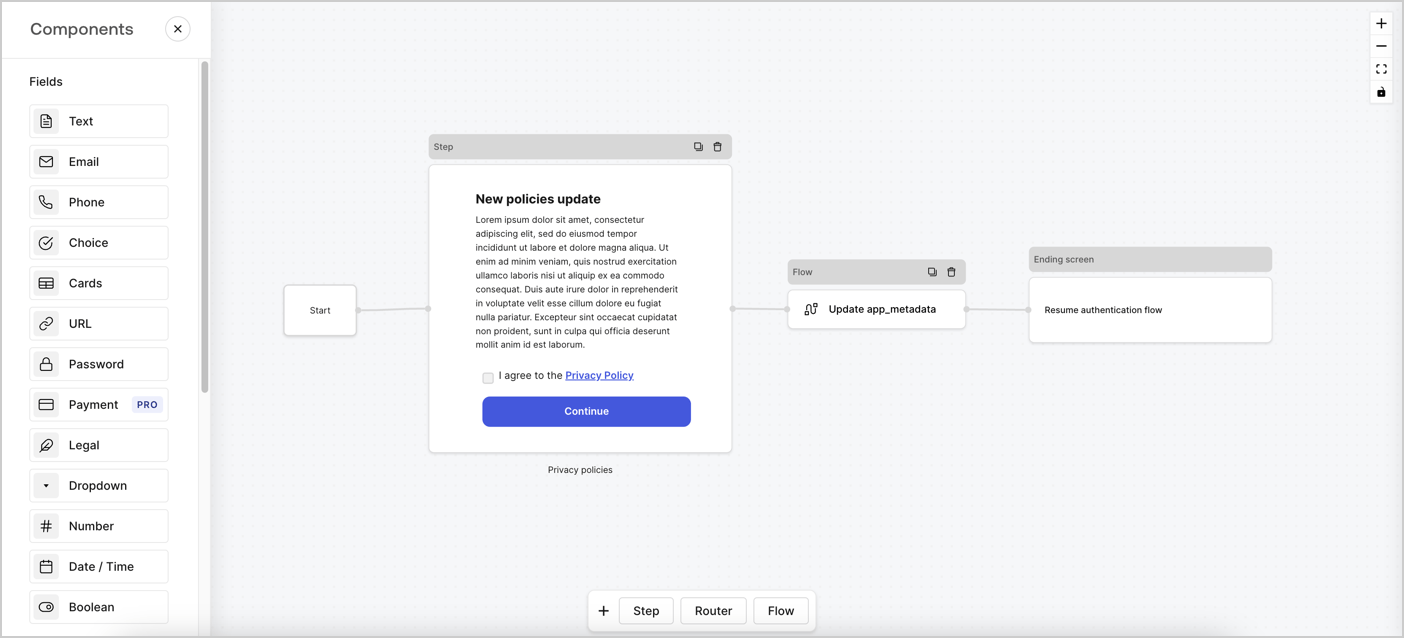
Forms for Actions allows you to create custom privacy policies flows and store the consent under the `app_metadata` object.
<Frame>
  <img src="https://mintcdn.com/docs-dev-feat-docs-5612-expanded-grant-support-ea/eFsXEYm7m6Xq7yzA/docs/images/cdy7uua7fh8z/6i68dMvHDTijfRmSgN1x8Q/ad900e7d4c0fb34645921435472b8684/privavy-policy-form.png?fit=max&auto=format&n=eFsXEYm7m6Xq7yzA&q=85&s=0a6e5d93183925d5451ce67f7240b2ce" alt="Dashboard > Actions > Forms > Privacy policy use case" data-og-width="1404" width="1404" data-og-height="638" height="638" data-path="docs/images/cdy7uua7fh8z/6i68dMvHDTijfRmSgN1x8Q/ad900e7d4c0fb34645921435472b8684/privavy-policy-form.png" data-optimize="true" data-opv="3" srcset="https://mintcdn.com/docs-dev-feat-docs-5612-expanded-grant-support-ea/eFsXEYm7m6Xq7yzA/docs/images/cdy7uua7fh8z/6i68dMvHDTijfRmSgN1x8Q/ad900e7d4c0fb34645921435472b8684/privavy-policy-form.png?w=280&fit=max&auto=format&n=eFsXEYm7m6Xq7yzA&q=85&s=46859eb3a3268e9ac82e3ad310f1020f 280w, https://mintcdn.com/docs-dev-feat-docs-5612-expanded-grant-support-ea/eFsXEYm7m6Xq7yzA/docs/images/cdy7uua7fh8z/6i68dMvHDTijfRmSgN1x8Q/ad900e7d4c0fb34645921435472b8684/privavy-policy-form.png?w=560&fit=max&auto=format&n=eFsXEYm7m6Xq7yzA&q=85&s=d4a310506e93e305101ef8feda3a1c67 560w, https://mintcdn.com/docs-dev-feat-docs-5612-expanded-grant-support-ea/eFsXEYm7m6Xq7yzA/docs/images/cdy7uua7fh8z/6i68dMvHDTijfRmSgN1x8Q/ad900e7d4c0fb34645921435472b8684/privavy-policy-form.png?w=840&fit=max&auto=format&n=eFsXEYm7m6Xq7yzA&q=85&s=1d2888c153b8fa4ba70d4bc8c136922f 840w, https://mintcdn.com/docs-dev-feat-docs-5612-expanded-grant-support-ea/eFsXEYm7m6Xq7yzA/docs/images/cdy7uua7fh8z/6i68dMvHDTijfRmSgN1x8Q/ad900e7d4c0fb34645921435472b8684/privavy-policy-form.png?w=1100&fit=max&auto=format&n=eFsXEYm7m6Xq7yzA&q=85&s=e3340b1c2567f0d488c865a6fedbcbb5 1100w, https://mintcdn.com/docs-dev-feat-docs-5612-expanded-grant-support-ea/eFsXEYm7m6Xq7yzA/docs/images/cdy7uua7fh8z/6i68dMvHDTijfRmSgN1x8Q/ad900e7d4c0fb34645921435472b8684/privavy-policy-form.png?w=1650&fit=max&auto=format&n=eFsXEYm7m6Xq7yzA&q=85&s=1f2f53bd252e0c590f2434de47e89804 1650w, https://mintcdn.com/docs-dev-feat-docs-5612-expanded-grant-support-ea/eFsXEYm7m6Xq7yzA/docs/images/cdy7uua7fh8z/6i68dMvHDTijfRmSgN1x8Q/ad900e7d4c0fb34645921435472b8684/privavy-policy-form.png?w=2500&fit=max&auto=format&n=eFsXEYm7m6Xq7yzA&q=85&s=cf8390578b20ee24bca58ef0fc6d2955 2500w" />
</Frame>

The sections below outline how you can create an Update Policy form using nodes and flows, along with steps for adding your form to a [Post Login](/docs/customize/actions/explore-triggers/signup-and-login-triggers/login-trigger) Action.

## Create a form from scratch

Follow these steps to create a form to gather information:

1. Open the Form editor by selecting **Auth0 Dashboard > Actions > Forms.**
2. Select **Create Form** > **Start from scratch**.

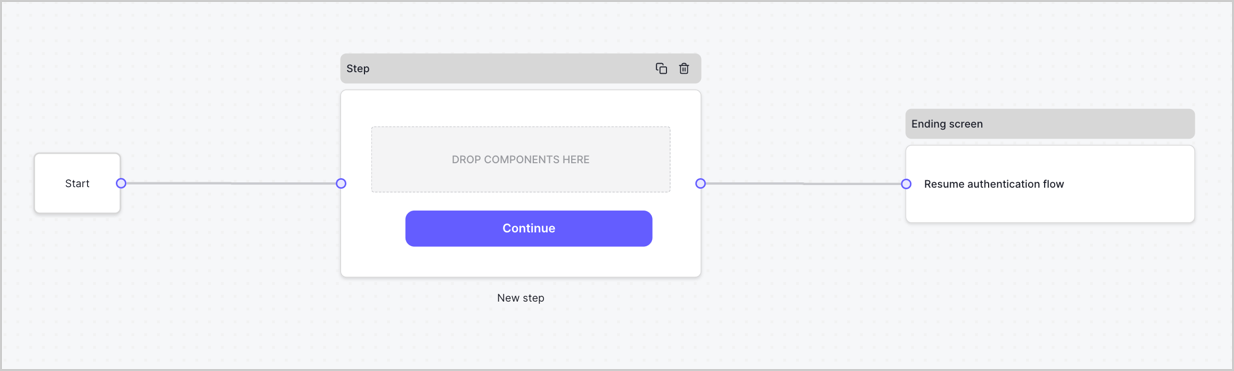
By default, a new form contains a Start node, a Step node, and an Ending screen node.
<Frame>
  <img src="https://mintcdn.com/docs-dev-feat-docs-5612-expanded-grant-support-ea/VOhouXEXS1syF493/docs/images/cdy7uua7fh8z/2TZ9jSjgEcARFpULI6hz4R/a4319a1bd482f2ee5cc23100fdb2f42c/New-form-Forms-for-action-use-case.png?fit=max&auto=format&n=VOhouXEXS1syF493&q=85&s=4385c6224b16ee4f88023082cf90ef73" alt="Dashboard > Forms > Use Cases > Form" data-og-width="1234" width="1234" data-og-height="371" height="371" data-path="docs/images/cdy7uua7fh8z/2TZ9jSjgEcARFpULI6hz4R/a4319a1bd482f2ee5cc23100fdb2f42c/New-form-Forms-for-action-use-case.png" data-optimize="true" data-opv="3" srcset="https://mintcdn.com/docs-dev-feat-docs-5612-expanded-grant-support-ea/VOhouXEXS1syF493/docs/images/cdy7uua7fh8z/2TZ9jSjgEcARFpULI6hz4R/a4319a1bd482f2ee5cc23100fdb2f42c/New-form-Forms-for-action-use-case.png?w=280&fit=max&auto=format&n=VOhouXEXS1syF493&q=85&s=8dea8ef45af4a0ae66e304ed153d8691 280w, https://mintcdn.com/docs-dev-feat-docs-5612-expanded-grant-support-ea/VOhouXEXS1syF493/docs/images/cdy7uua7fh8z/2TZ9jSjgEcARFpULI6hz4R/a4319a1bd482f2ee5cc23100fdb2f42c/New-form-Forms-for-action-use-case.png?w=560&fit=max&auto=format&n=VOhouXEXS1syF493&q=85&s=e18c110a245f9fda1d8b170278c12919 560w, https://mintcdn.com/docs-dev-feat-docs-5612-expanded-grant-support-ea/VOhouXEXS1syF493/docs/images/cdy7uua7fh8z/2TZ9jSjgEcARFpULI6hz4R/a4319a1bd482f2ee5cc23100fdb2f42c/New-form-Forms-for-action-use-case.png?w=840&fit=max&auto=format&n=VOhouXEXS1syF493&q=85&s=079ba2f222a4934e33f2d006e2bf5f46 840w, https://mintcdn.com/docs-dev-feat-docs-5612-expanded-grant-support-ea/VOhouXEXS1syF493/docs/images/cdy7uua7fh8z/2TZ9jSjgEcARFpULI6hz4R/a4319a1bd482f2ee5cc23100fdb2f42c/New-form-Forms-for-action-use-case.png?w=1100&fit=max&auto=format&n=VOhouXEXS1syF493&q=85&s=b6e9845c1fa738dedfa1865f95a53707 1100w, https://mintcdn.com/docs-dev-feat-docs-5612-expanded-grant-support-ea/VOhouXEXS1syF493/docs/images/cdy7uua7fh8z/2TZ9jSjgEcARFpULI6hz4R/a4319a1bd482f2ee5cc23100fdb2f42c/New-form-Forms-for-action-use-case.png?w=1650&fit=max&auto=format&n=VOhouXEXS1syF493&q=85&s=ea9d44878d85f825f942d8e65e1d1690 1650w, https://mintcdn.com/docs-dev-feat-docs-5612-expanded-grant-support-ea/VOhouXEXS1syF493/docs/images/cdy7uua7fh8z/2TZ9jSjgEcARFpULI6hz4R/a4319a1bd482f2ee5cc23100fdb2f42c/New-form-Forms-for-action-use-case.png?w=2500&fit=max&auto=format&n=VOhouXEXS1syF493&q=85&s=9c2b919645557fc6a90bd335c4ec004c 2500w" />
</Frame>

### Configure the Step node

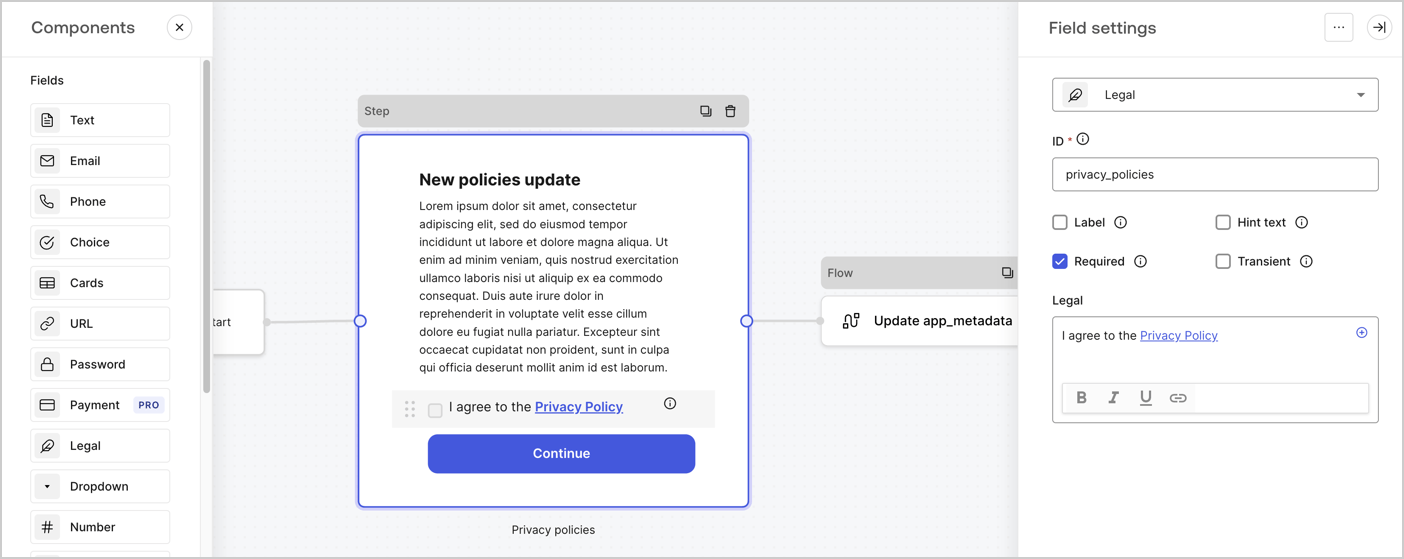
The Step node is the graphical interface visible to users. Add [Fields](/docs/customize/forms/nodes-and-components) to the Step node to collect the new agreement acceptance value by following these steps:

1. Drag a **Rich text** field from the **Components menu** into the **Step** node.

   * **Rich text**: Enter a description of your privacy policies updates.
   * Select **Save**.
2. Drag a **Legal** field into the **Step** node.

   * **ID**: Enter `privacy_policies`.
   * **Required**: Enable the checkbox.
   * **Legal**: Enter `I agree to the Privacy Policy`.
   * Select **Save**.
3. Select **Publish** to save.
<Frame>
  <img src="https://mintcdn.com/docs-dev-feat-docs-5612-expanded-grant-support-ea/unUdj8-aZq-Be-da/docs/images/cdy7uua7fh8z/59zFFjQjAnjogkc2QGIqqJ/0ad66b1b636544122aa4e65968b76c2c/privacy-policy-step-node.png?fit=max&auto=format&n=unUdj8-aZq-Be-da&q=85&s=c839020461acb1028b8b0e2f11ba3c1f" alt="Dashboard > Actions > Forms > Use case privacy policy step node" data-og-width="1404" width="1404" data-og-height="559" height="559" data-path="docs/images/cdy7uua7fh8z/59zFFjQjAnjogkc2QGIqqJ/0ad66b1b636544122aa4e65968b76c2c/privacy-policy-step-node.png" data-optimize="true" data-opv="3" srcset="https://mintcdn.com/docs-dev-feat-docs-5612-expanded-grant-support-ea/unUdj8-aZq-Be-da/docs/images/cdy7uua7fh8z/59zFFjQjAnjogkc2QGIqqJ/0ad66b1b636544122aa4e65968b76c2c/privacy-policy-step-node.png?w=280&fit=max&auto=format&n=unUdj8-aZq-Be-da&q=85&s=d237b2eef01b96db2bb197a0096e8179 280w, https://mintcdn.com/docs-dev-feat-docs-5612-expanded-grant-support-ea/unUdj8-aZq-Be-da/docs/images/cdy7uua7fh8z/59zFFjQjAnjogkc2QGIqqJ/0ad66b1b636544122aa4e65968b76c2c/privacy-policy-step-node.png?w=560&fit=max&auto=format&n=unUdj8-aZq-Be-da&q=85&s=90267583bd24d0507c41c29a2e21595b 560w, https://mintcdn.com/docs-dev-feat-docs-5612-expanded-grant-support-ea/unUdj8-aZq-Be-da/docs/images/cdy7uua7fh8z/59zFFjQjAnjogkc2QGIqqJ/0ad66b1b636544122aa4e65968b76c2c/privacy-policy-step-node.png?w=840&fit=max&auto=format&n=unUdj8-aZq-Be-da&q=85&s=a124b7fe8dcb0dda99776d20f078dc7f 840w, https://mintcdn.com/docs-dev-feat-docs-5612-expanded-grant-support-ea/unUdj8-aZq-Be-da/docs/images/cdy7uua7fh8z/59zFFjQjAnjogkc2QGIqqJ/0ad66b1b636544122aa4e65968b76c2c/privacy-policy-step-node.png?w=1100&fit=max&auto=format&n=unUdj8-aZq-Be-da&q=85&s=08e445013cd1a3a0ac9dfa02de333058 1100w, https://mintcdn.com/docs-dev-feat-docs-5612-expanded-grant-support-ea/unUdj8-aZq-Be-da/docs/images/cdy7uua7fh8z/59zFFjQjAnjogkc2QGIqqJ/0ad66b1b636544122aa4e65968b76c2c/privacy-policy-step-node.png?w=1650&fit=max&auto=format&n=unUdj8-aZq-Be-da&q=85&s=468667807579d9bf6e783521eafb5f04 1650w, https://mintcdn.com/docs-dev-feat-docs-5612-expanded-grant-support-ea/unUdj8-aZq-Be-da/docs/images/cdy7uua7fh8z/59zFFjQjAnjogkc2QGIqqJ/0ad66b1b636544122aa4e65968b76c2c/privacy-policy-step-node.png?w=2500&fit=max&auto=format&n=unUdj8-aZq-Be-da&q=85&s=981b335107d3a6646d55b47be9b69230 2500w" />
</Frame>

### Configure the Flow node

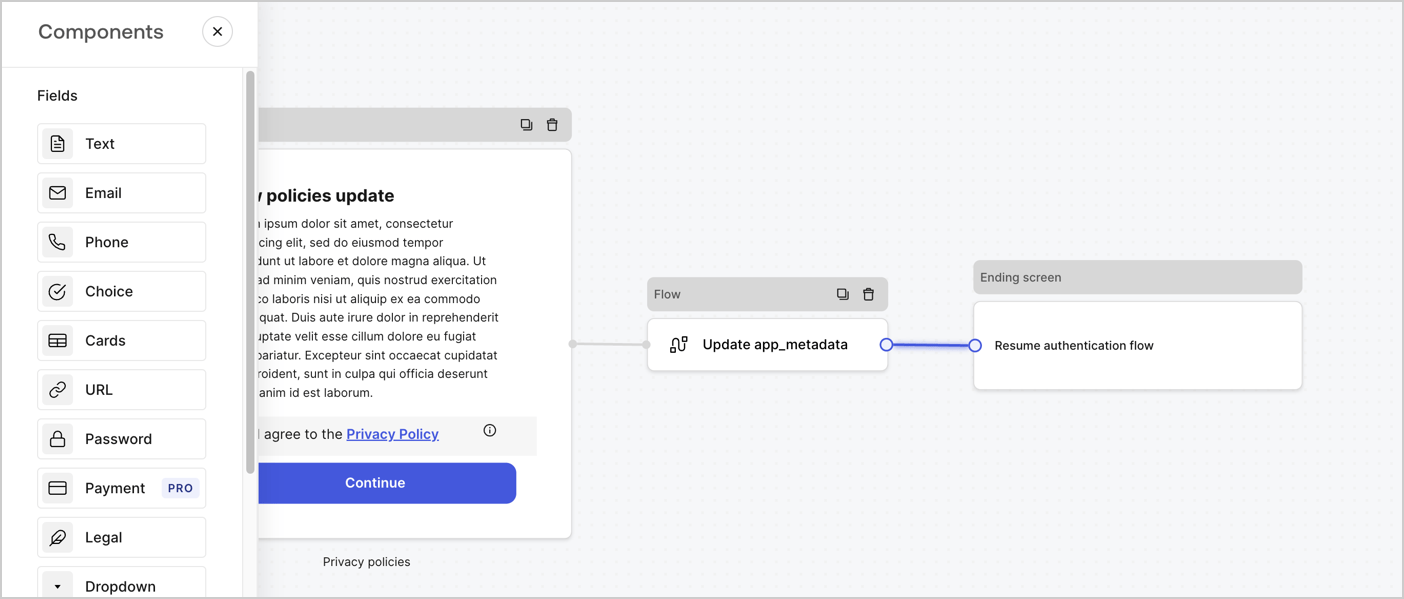
Add a **Flow** node after the **Step** node to update the `app_metadata` and resume the authentication flow by following these steps:

1. Select **Flow** from the bottom of the Form editor.
2. Remove the existing link between the **Step** and **Ending Screen** nodes.
3. Select the new **Flow** > **Click to add a flow** > **Create a new flow.**

   * Enter `Update app_metadata` in the **Name** field.
   * Select **Create**.
   * Select **Save**.
4. Link the **Flow** node to the **Step** and **Ending Screen** nodes as pictured below.
5. Select **Publish** to save.
<Frame>
  <img src="https://mintcdn.com/docs-dev-feat-docs-5612-expanded-grant-support-ea/eFsXEYm7m6Xq7yzA/docs/images/cdy7uua7fh8z/6YIkzm7SrpM9LW76AXuRzh/353c518fe82bbaa440836da1d83596d6/link-policies.png?fit=max&auto=format&n=eFsXEYm7m6Xq7yzA&q=85&s=2ae8e69a3ffbc47a670d63ffe4be7627" alt="Dashboard > Actions > Forms > Form" data-og-width="1404" width="1404" data-og-height="599" height="599" data-path="docs/images/cdy7uua7fh8z/6YIkzm7SrpM9LW76AXuRzh/353c518fe82bbaa440836da1d83596d6/link-policies.png" data-optimize="true" data-opv="3" srcset="https://mintcdn.com/docs-dev-feat-docs-5612-expanded-grant-support-ea/eFsXEYm7m6Xq7yzA/docs/images/cdy7uua7fh8z/6YIkzm7SrpM9LW76AXuRzh/353c518fe82bbaa440836da1d83596d6/link-policies.png?w=280&fit=max&auto=format&n=eFsXEYm7m6Xq7yzA&q=85&s=efbf3a22eb1789e6872950121458654c 280w, https://mintcdn.com/docs-dev-feat-docs-5612-expanded-grant-support-ea/eFsXEYm7m6Xq7yzA/docs/images/cdy7uua7fh8z/6YIkzm7SrpM9LW76AXuRzh/353c518fe82bbaa440836da1d83596d6/link-policies.png?w=560&fit=max&auto=format&n=eFsXEYm7m6Xq7yzA&q=85&s=b35ae310acbc22ec602368331516f18c 560w, https://mintcdn.com/docs-dev-feat-docs-5612-expanded-grant-support-ea/eFsXEYm7m6Xq7yzA/docs/images/cdy7uua7fh8z/6YIkzm7SrpM9LW76AXuRzh/353c518fe82bbaa440836da1d83596d6/link-policies.png?w=840&fit=max&auto=format&n=eFsXEYm7m6Xq7yzA&q=85&s=ffe9f2f798c719226352e63b9c6e8a73 840w, https://mintcdn.com/docs-dev-feat-docs-5612-expanded-grant-support-ea/eFsXEYm7m6Xq7yzA/docs/images/cdy7uua7fh8z/6YIkzm7SrpM9LW76AXuRzh/353c518fe82bbaa440836da1d83596d6/link-policies.png?w=1100&fit=max&auto=format&n=eFsXEYm7m6Xq7yzA&q=85&s=121346141f7b4b3cb9fdb61e491d1934 1100w, https://mintcdn.com/docs-dev-feat-docs-5612-expanded-grant-support-ea/eFsXEYm7m6Xq7yzA/docs/images/cdy7uua7fh8z/6YIkzm7SrpM9LW76AXuRzh/353c518fe82bbaa440836da1d83596d6/link-policies.png?w=1650&fit=max&auto=format&n=eFsXEYm7m6Xq7yzA&q=85&s=631e3708271b401d3c95a71782e8f781 1650w, https://mintcdn.com/docs-dev-feat-docs-5612-expanded-grant-support-ea/eFsXEYm7m6Xq7yzA/docs/images/cdy7uua7fh8z/6YIkzm7SrpM9LW76AXuRzh/353c518fe82bbaa440836da1d83596d6/link-policies.png?w=2500&fit=max&auto=format&n=eFsXEYm7m6Xq7yzA&q=85&s=ef860e45e6bbc4d67946eb793365e481 2500w" />
</Frame>

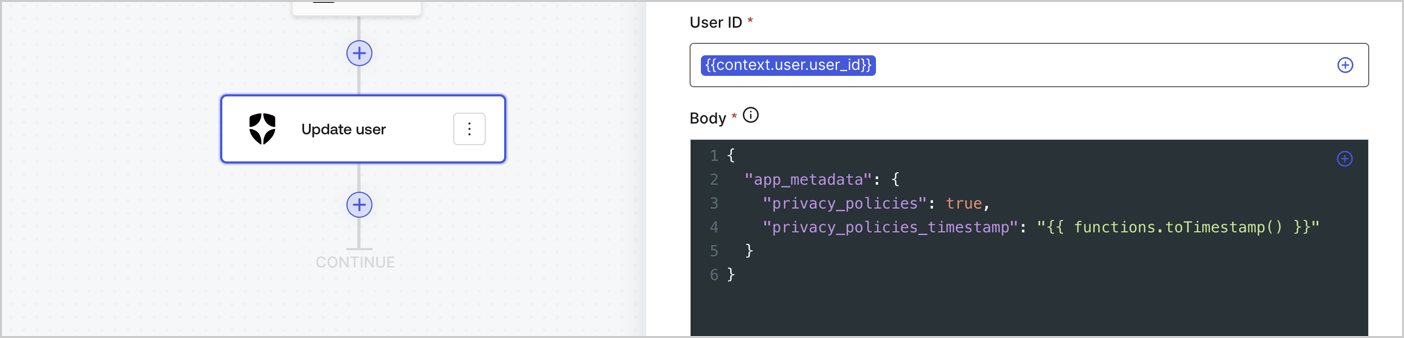
Add an Auth0 Update user action to the flow by following these steps:

1. Select the **Flow** **Update app\_metadata** > **Edit flow** to open the Flow editor in a new tab.
2. Below the StartAction, select the **+** icon to add an **Update user** action. Complete the fields below, then select **Save** to continue.

   * **Connection**: Select from the dropdown the Vault connection to your M2M application.

   * **User ID**: Enter `{{context.user.user_id}}`.

   * **Body**: Copy and paste the following code to update the app\_metadata with the privacy\_policies and privacy\_policies\_timestamp properties.

     ```text lines theme={null}
     {
       "app_metadata": {
         "privacy_policies": true,
         "privacy_policies_timestamp": "{{ functions.toTimestamp() }}"
       }
     }
     ```

   * Select **Save**.
3. Select **Publish** to save.
<Frame>
  <img src="https://mintcdn.com/docs-dev-feat-docs-5612-expanded-grant-support-ea/XvZoMSjYtQPr3mUg/docs/images/cdy7uua7fh8z/CvMNIwWrOUwaFW4X3G28p/1fb70ae57a20749d9ffaaba8dc0b7e26/update-user-privacy.png?fit=max&auto=format&n=XvZoMSjYtQPr3mUg&q=85&s=0e9520841b9a1fb51cb8faa3c60f38e8" alt="Dashboard > Actions > Forms > User case privacy policy code" data-og-width="1404" width="1404" data-og-height="338" height="338" data-path="docs/images/cdy7uua7fh8z/CvMNIwWrOUwaFW4X3G28p/1fb70ae57a20749d9ffaaba8dc0b7e26/update-user-privacy.png" data-optimize="true" data-opv="3" srcset="https://mintcdn.com/docs-dev-feat-docs-5612-expanded-grant-support-ea/XvZoMSjYtQPr3mUg/docs/images/cdy7uua7fh8z/CvMNIwWrOUwaFW4X3G28p/1fb70ae57a20749d9ffaaba8dc0b7e26/update-user-privacy.png?w=280&fit=max&auto=format&n=XvZoMSjYtQPr3mUg&q=85&s=c7b969d39b23529153c5d0a5139f657d 280w, https://mintcdn.com/docs-dev-feat-docs-5612-expanded-grant-support-ea/XvZoMSjYtQPr3mUg/docs/images/cdy7uua7fh8z/CvMNIwWrOUwaFW4X3G28p/1fb70ae57a20749d9ffaaba8dc0b7e26/update-user-privacy.png?w=560&fit=max&auto=format&n=XvZoMSjYtQPr3mUg&q=85&s=02feb468862b31008874941e5df50c04 560w, https://mintcdn.com/docs-dev-feat-docs-5612-expanded-grant-support-ea/XvZoMSjYtQPr3mUg/docs/images/cdy7uua7fh8z/CvMNIwWrOUwaFW4X3G28p/1fb70ae57a20749d9ffaaba8dc0b7e26/update-user-privacy.png?w=840&fit=max&auto=format&n=XvZoMSjYtQPr3mUg&q=85&s=29141c4ec71ed371984a10289fb3c2e1 840w, https://mintcdn.com/docs-dev-feat-docs-5612-expanded-grant-support-ea/XvZoMSjYtQPr3mUg/docs/images/cdy7uua7fh8z/CvMNIwWrOUwaFW4X3G28p/1fb70ae57a20749d9ffaaba8dc0b7e26/update-user-privacy.png?w=1100&fit=max&auto=format&n=XvZoMSjYtQPr3mUg&q=85&s=35238db31537c51c64a07cd73fd0d075 1100w, https://mintcdn.com/docs-dev-feat-docs-5612-expanded-grant-support-ea/XvZoMSjYtQPr3mUg/docs/images/cdy7uua7fh8z/CvMNIwWrOUwaFW4X3G28p/1fb70ae57a20749d9ffaaba8dc0b7e26/update-user-privacy.png?w=1650&fit=max&auto=format&n=XvZoMSjYtQPr3mUg&q=85&s=9319a77f32dec58e0dbead90c9b44c7b 1650w, https://mintcdn.com/docs-dev-feat-docs-5612-expanded-grant-support-ea/XvZoMSjYtQPr3mUg/docs/images/cdy7uua7fh8z/CvMNIwWrOUwaFW4X3G28p/1fb70ae57a20749d9ffaaba8dc0b7e26/update-user-privacy.png?w=2500&fit=max&auto=format&n=XvZoMSjYtQPr3mUg&q=85&s=012f32c7fae92869492c400e2588fab7 2500w" />
</Frame>

<Callout icon="file-lines" color="#0EA5E9" iconType="regular">
  The flow **Update app\_metadata** adds a `privacy_policies true` value to the app`_metadata` object and also generates a timestamp with a [helper function.](/docs/customize/forms/variables)
</Callout>

## Retrieve the form render code

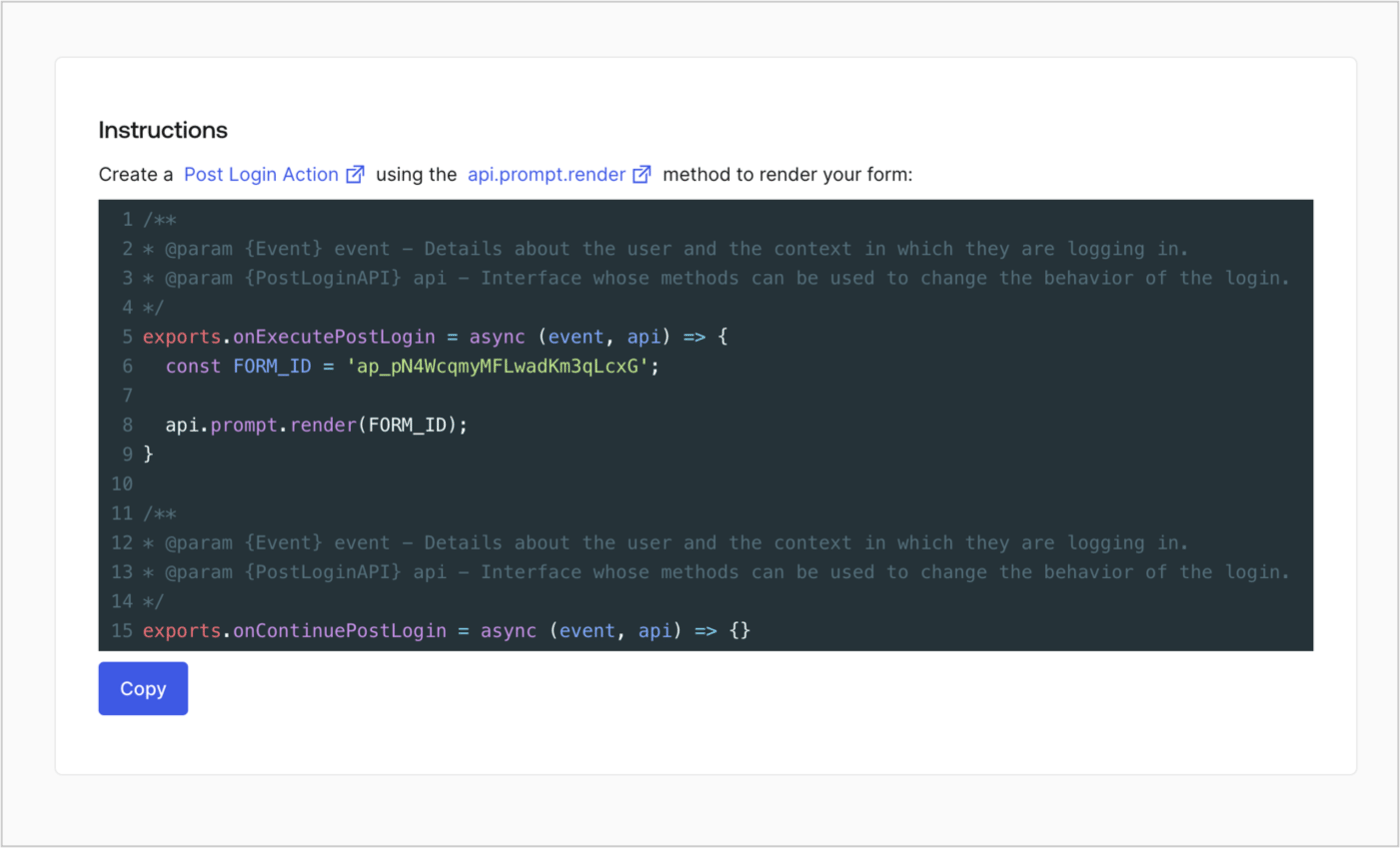
Retrieve your form render code to visually render the form with a custom Post Login Action by following these steps:

* From the Form editor, select **`<> Render`**.
* Select **Copy**.
<Frame>
  <img src="https://mintcdn.com/docs-dev-feat-docs-5612-expanded-grant-support-ea/E7UrUEe-dEh_F8Pm/docs/images/cdy7uua7fh8z/2EIUzc539sq9lwoTKbjoJv/496a864c0fc44a782c9cadca119dbfb0/embed.png?fit=max&auto=format&n=E7UrUEe-dEh_F8Pm&q=85&s=a7b3b4b43e7a86fe464782403d4dee63" alt="Dashboard > Actions > Forms > Form > Embed" data-og-width="1400" width="1400" data-og-height="848" height="848" data-path="docs/images/cdy7uua7fh8z/2EIUzc539sq9lwoTKbjoJv/496a864c0fc44a782c9cadca119dbfb0/embed.png" data-optimize="true" data-opv="3" srcset="https://mintcdn.com/docs-dev-feat-docs-5612-expanded-grant-support-ea/E7UrUEe-dEh_F8Pm/docs/images/cdy7uua7fh8z/2EIUzc539sq9lwoTKbjoJv/496a864c0fc44a782c9cadca119dbfb0/embed.png?w=280&fit=max&auto=format&n=E7UrUEe-dEh_F8Pm&q=85&s=528ed446e9de6499d06372393fd0c7b7 280w, https://mintcdn.com/docs-dev-feat-docs-5612-expanded-grant-support-ea/E7UrUEe-dEh_F8Pm/docs/images/cdy7uua7fh8z/2EIUzc539sq9lwoTKbjoJv/496a864c0fc44a782c9cadca119dbfb0/embed.png?w=560&fit=max&auto=format&n=E7UrUEe-dEh_F8Pm&q=85&s=86d51125dc550acf1bbdd9e8b4bb3469 560w, https://mintcdn.com/docs-dev-feat-docs-5612-expanded-grant-support-ea/E7UrUEe-dEh_F8Pm/docs/images/cdy7uua7fh8z/2EIUzc539sq9lwoTKbjoJv/496a864c0fc44a782c9cadca119dbfb0/embed.png?w=840&fit=max&auto=format&n=E7UrUEe-dEh_F8Pm&q=85&s=5bf307a3e9dfdad9ccba2bb4c0c12714 840w, https://mintcdn.com/docs-dev-feat-docs-5612-expanded-grant-support-ea/E7UrUEe-dEh_F8Pm/docs/images/cdy7uua7fh8z/2EIUzc539sq9lwoTKbjoJv/496a864c0fc44a782c9cadca119dbfb0/embed.png?w=1100&fit=max&auto=format&n=E7UrUEe-dEh_F8Pm&q=85&s=9dbe1e80880bb3c0749ee2a41f4deb43 1100w, https://mintcdn.com/docs-dev-feat-docs-5612-expanded-grant-support-ea/E7UrUEe-dEh_F8Pm/docs/images/cdy7uua7fh8z/2EIUzc539sq9lwoTKbjoJv/496a864c0fc44a782c9cadca119dbfb0/embed.png?w=1650&fit=max&auto=format&n=E7UrUEe-dEh_F8Pm&q=85&s=092b748a15d6dee8c241f713c0371364 1650w, https://mintcdn.com/docs-dev-feat-docs-5612-expanded-grant-support-ea/E7UrUEe-dEh_F8Pm/docs/images/cdy7uua7fh8z/2EIUzc539sq9lwoTKbjoJv/496a864c0fc44a782c9cadca119dbfb0/embed.png?w=2500&fit=max&auto=format&n=E7UrUEe-dEh_F8Pm&q=85&s=dfc11e4bfb0d69fe8b85dc1dd8f86ce5 2500w" />
</Frame>

## Create a Post Login Action

Create a post-login Action to render your form by following these steps:

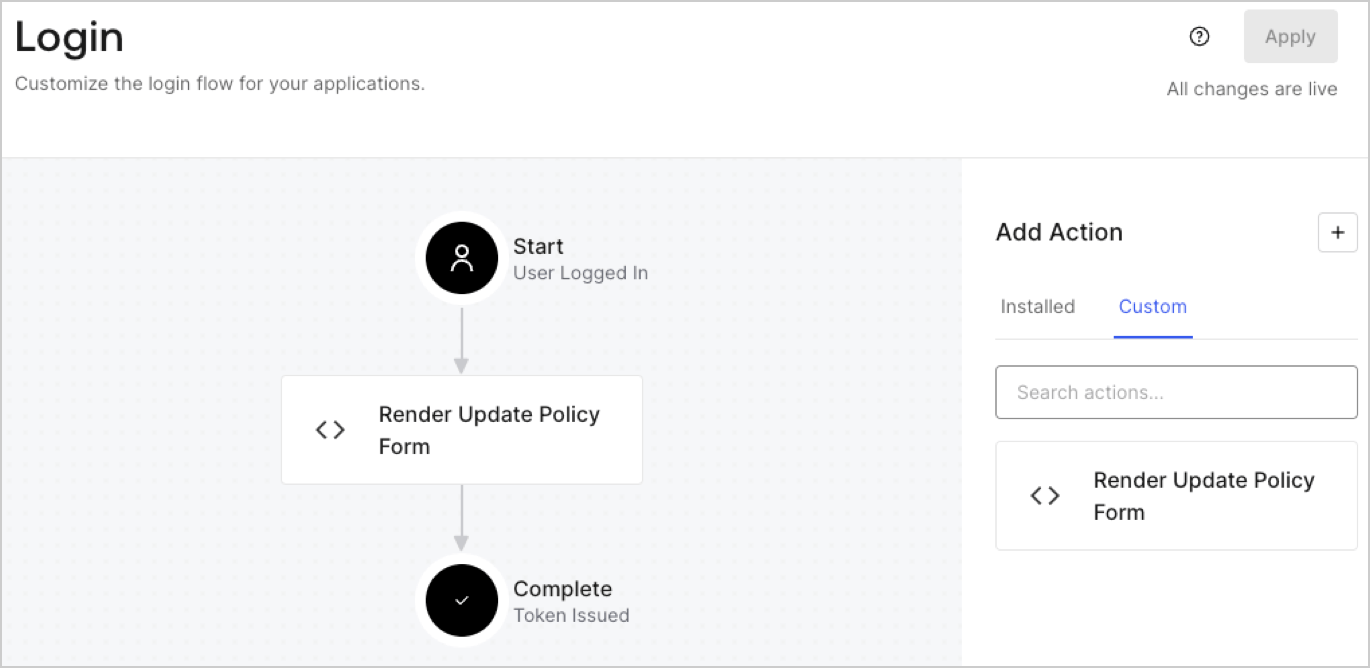
1. Navigate to **Auth0 Dashboard > Actions > Flows > Login.**
2. Select the **+** icon and Select **Build from scratch**:

   * **Name**: Enter `Render Update Policy Form`.
   * **Trigger**: Select `Login / Post Login`.
   * **Runtime**: Select the recommended version.
3. Select **Create**.

To configure the post-login Action:

1. Delete the existing code from the Code editor.
2. Paste the form render code into the Code editor.
3. Edit the code to define the conditional logic that will render the form.

   ```javascript lines theme={null}
   /**
   * @param {Event} event - Details about the user and the context in which they are logging in.
   * @param {PostLoginAPI} api - Interface whose methods can be used to change the behavior of the login.
   */
   exports.onExecutePostLogin = async (event, api) => {
     const FORM_ID = 'REPLACE_WITH_YOUR_FORM_ID';

     if (event.user.app_metadata.privacy_policies !== true) {
       api.prompt.render(FORM_ID);
     }
   }

   exports.onContinuePostLogin = async (event, api) => { }
   ```

   <Callout icon="file-lines" color="#0EA5E9" iconType="regular">
     The example code above will render the form when a user is missing the app metadata `privacy_policies` property.
   </Callout>
4. Select **Deploy.**
5. Drag and Drop the **Render Update Policy Form** Action to the **Login** flow.
   <Frame>
     <img src="https://mintcdn.com/docs-dev-feat-docs-5612-expanded-grant-support-ea/zKRtAyF9QzitOXOg/docs/images/cdy7uua7fh8z/5TOwDgevZsBqd7yZynUYWU/41ca909dc3007aed4f40ff794a05efa5/postlogin.png?fit=max&auto=format&n=zKRtAyF9QzitOXOg&q=85&s=67a0337ae98665a7af8c2c24fb1cb5f8" alt="Dashboard > Forms > Use Case > Render update policy form login action" data-og-width="1370" width="1370" data-og-height="668" height="668" data-path="docs/images/cdy7uua7fh8z/5TOwDgevZsBqd7yZynUYWU/41ca909dc3007aed4f40ff794a05efa5/postlogin.png" data-optimize="true" data-opv="3" srcset="https://mintcdn.com/docs-dev-feat-docs-5612-expanded-grant-support-ea/zKRtAyF9QzitOXOg/docs/images/cdy7uua7fh8z/5TOwDgevZsBqd7yZynUYWU/41ca909dc3007aed4f40ff794a05efa5/postlogin.png?w=280&fit=max&auto=format&n=zKRtAyF9QzitOXOg&q=85&s=8d4399f01110b33f282849633a7ec3e8 280w, https://mintcdn.com/docs-dev-feat-docs-5612-expanded-grant-support-ea/zKRtAyF9QzitOXOg/docs/images/cdy7uua7fh8z/5TOwDgevZsBqd7yZynUYWU/41ca909dc3007aed4f40ff794a05efa5/postlogin.png?w=560&fit=max&auto=format&n=zKRtAyF9QzitOXOg&q=85&s=f9bb68fe62b37c30f71a6cd9e320bdf5 560w, https://mintcdn.com/docs-dev-feat-docs-5612-expanded-grant-support-ea/zKRtAyF9QzitOXOg/docs/images/cdy7uua7fh8z/5TOwDgevZsBqd7yZynUYWU/41ca909dc3007aed4f40ff794a05efa5/postlogin.png?w=840&fit=max&auto=format&n=zKRtAyF9QzitOXOg&q=85&s=3a6e8f396623964a7f837eadc527ab2b 840w, https://mintcdn.com/docs-dev-feat-docs-5612-expanded-grant-support-ea/zKRtAyF9QzitOXOg/docs/images/cdy7uua7fh8z/5TOwDgevZsBqd7yZynUYWU/41ca909dc3007aed4f40ff794a05efa5/postlogin.png?w=1100&fit=max&auto=format&n=zKRtAyF9QzitOXOg&q=85&s=12d11afe5f5f3a14596630b63c9b83f1 1100w, https://mintcdn.com/docs-dev-feat-docs-5612-expanded-grant-support-ea/zKRtAyF9QzitOXOg/docs/images/cdy7uua7fh8z/5TOwDgevZsBqd7yZynUYWU/41ca909dc3007aed4f40ff794a05efa5/postlogin.png?w=1650&fit=max&auto=format&n=zKRtAyF9QzitOXOg&q=85&s=457b254c80e318d2adc51586b4995a2b 1650w, https://mintcdn.com/docs-dev-feat-docs-5612-expanded-grant-support-ea/zKRtAyF9QzitOXOg/docs/images/cdy7uua7fh8z/5TOwDgevZsBqd7yZynUYWU/41ca909dc3007aed4f40ff794a05efa5/postlogin.png?w=2500&fit=max&auto=format&n=zKRtAyF9QzitOXOg&q=85&s=da0e8c0eff6b526721f06d8952c8ff48 2500w" />
   </Frame>
6. Select **Apply.**

### Test implementation

Test the implementation by following these steps:

1. Log in with an existing user whose app`_metadata` attribute `privacy_policies` does not have a value.
2. The post-login Action in the Login flow will render the form and prompt for acceptance.
3. Select **Auth0 Dashboard > User Management > Users,** locate the user and verify that the `app_metadata` attribute `privacy_policies` contains a `true` value and a timestamp.
