> ## Documentation Index
> Fetch the complete documentation index at: https://docs-dev-feat-docs-5612-expanded-grant-support-ea.mintlify.site/llms.txt
> Use this file to discover all available pages before exploring further.

> 外部 API やサービスへの HTTP リクエストを認可するための、HTTP Vault 接続の設定方法を学びます。

# HTTP Vault 接続

<h2 id="configure-your-http-vault-connection-options">
  HTTP Vault 接続オプションを設定する
</h2>

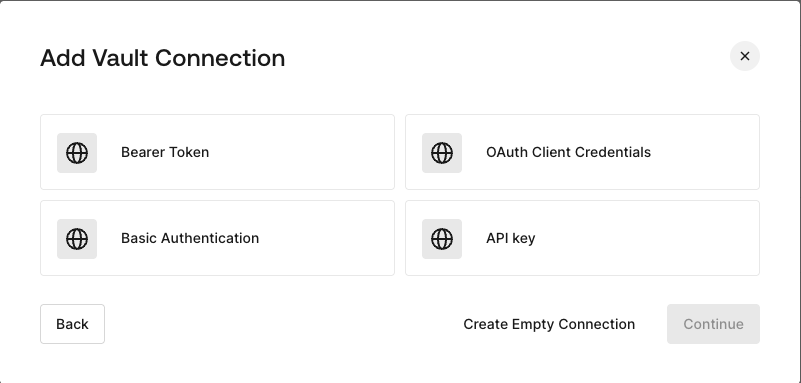
HTTP Vault 接続ではさまざまな認証オプションを設定でき、HTTP Request フローの Actions で利用できます。
<Frame>
  <img src="https://mintcdn.com/docs-dev-feat-docs-5612-expanded-grant-support-ea/fO9QR70_Gdrw6w5B/docs/images/customize/forms/vaults/http-vault-connection-options.png?fit=max&auto=format&n=fO9QR70_Gdrw6w5B&q=85&s=c1da66f69f901f1132b0bd1ae92b5bba" alt="Auth0 Dashboard > Actions > フォーム > Vault > HTTP" data-og-width="801" width="801" data-og-height="383" height="383" data-path="docs/images/customize/forms/vaults/http-vault-connection-options.png" data-optimize="true" data-opv="3" srcset="https://mintcdn.com/docs-dev-feat-docs-5612-expanded-grant-support-ea/fO9QR70_Gdrw6w5B/docs/images/customize/forms/vaults/http-vault-connection-options.png?w=280&fit=max&auto=format&n=fO9QR70_Gdrw6w5B&q=85&s=17b9fec32ce6755025b1c9b34d372438 280w, https://mintcdn.com/docs-dev-feat-docs-5612-expanded-grant-support-ea/fO9QR70_Gdrw6w5B/docs/images/customize/forms/vaults/http-vault-connection-options.png?w=560&fit=max&auto=format&n=fO9QR70_Gdrw6w5B&q=85&s=88da0982ebdca00612ba142f7744d134 560w, https://mintcdn.com/docs-dev-feat-docs-5612-expanded-grant-support-ea/fO9QR70_Gdrw6w5B/docs/images/customize/forms/vaults/http-vault-connection-options.png?w=840&fit=max&auto=format&n=fO9QR70_Gdrw6w5B&q=85&s=7fde10e778071f121492b6e18614b766 840w, https://mintcdn.com/docs-dev-feat-docs-5612-expanded-grant-support-ea/fO9QR70_Gdrw6w5B/docs/images/customize/forms/vaults/http-vault-connection-options.png?w=1100&fit=max&auto=format&n=fO9QR70_Gdrw6w5B&q=85&s=9196694a4acbca4285370115ecc8dcb5 1100w, https://mintcdn.com/docs-dev-feat-docs-5612-expanded-grant-support-ea/fO9QR70_Gdrw6w5B/docs/images/customize/forms/vaults/http-vault-connection-options.png?w=1650&fit=max&auto=format&n=fO9QR70_Gdrw6w5B&q=85&s=b044210440c13daee4ccf672c880e025 1650w, https://mintcdn.com/docs-dev-feat-docs-5612-expanded-grant-support-ea/fO9QR70_Gdrw6w5B/docs/images/customize/forms/vaults/http-vault-connection-options.png?w=2500&fit=max&auto=format&n=fO9QR70_Gdrw6w5B&q=85&s=8da53cae52feccad13d81e97e2bcfe22 2500w" />
</Frame>

<h2 id="configure-your-http-vault-connection-for-bearer-token">
  Bearer Token 用の HTTP Vault 接続を設定する
</h2>

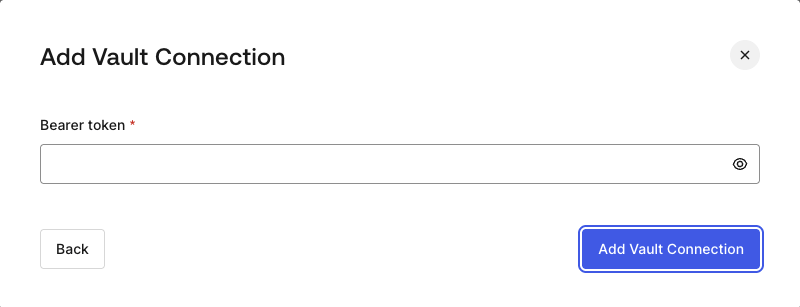
**Bearer Token** 認証を使用する HTTP Vault 接続を設定するには、必要なパラメーターを設定します。
<Frame>
  <img src="https://mintcdn.com/docs-dev-feat-docs-5612-expanded-grant-support-ea/fO9QR70_Gdrw6w5B/docs/images/customize/forms/vaults/http-vault-connection-bearer-token.png?fit=max&auto=format&n=fO9QR70_Gdrw6w5B&q=85&s=a4e8a9f116948319e4dad77a039d9f2f" alt="Auth0 Dashboard > Actions > フォーム > Vault > HTTP" data-og-width="800" width="800" data-og-height="307" height="307" data-path="docs/images/customize/forms/vaults/http-vault-connection-bearer-token.png" data-optimize="true" data-opv="3" srcset="https://mintcdn.com/docs-dev-feat-docs-5612-expanded-grant-support-ea/fO9QR70_Gdrw6w5B/docs/images/customize/forms/vaults/http-vault-connection-bearer-token.png?w=280&fit=max&auto=format&n=fO9QR70_Gdrw6w5B&q=85&s=b36fc3a962de9885ddc6a782a3710dde 280w, https://mintcdn.com/docs-dev-feat-docs-5612-expanded-grant-support-ea/fO9QR70_Gdrw6w5B/docs/images/customize/forms/vaults/http-vault-connection-bearer-token.png?w=560&fit=max&auto=format&n=fO9QR70_Gdrw6w5B&q=85&s=e7e714b03a776c4e500360ab3b2932cb 560w, https://mintcdn.com/docs-dev-feat-docs-5612-expanded-grant-support-ea/fO9QR70_Gdrw6w5B/docs/images/customize/forms/vaults/http-vault-connection-bearer-token.png?w=840&fit=max&auto=format&n=fO9QR70_Gdrw6w5B&q=85&s=71d3921472ce407bc1cc816b524eaa95 840w, https://mintcdn.com/docs-dev-feat-docs-5612-expanded-grant-support-ea/fO9QR70_Gdrw6w5B/docs/images/customize/forms/vaults/http-vault-connection-bearer-token.png?w=1100&fit=max&auto=format&n=fO9QR70_Gdrw6w5B&q=85&s=e0aa40ac34efd00649b7231f06769d58 1100w, https://mintcdn.com/docs-dev-feat-docs-5612-expanded-grant-support-ea/fO9QR70_Gdrw6w5B/docs/images/customize/forms/vaults/http-vault-connection-bearer-token.png?w=1650&fit=max&auto=format&n=fO9QR70_Gdrw6w5B&q=85&s=7607a387e746c498dc925038ee7e2b0d 1650w, https://mintcdn.com/docs-dev-feat-docs-5612-expanded-grant-support-ea/fO9QR70_Gdrw6w5B/docs/images/customize/forms/vaults/http-vault-connection-bearer-token.png?w=2500&fit=max&auto=format&n=fO9QR70_Gdrw6w5B&q=85&s=7933447d012fa5ef858891398fbe1767 2500w" />
</Frame>

<h3 id="input-settings">
  入力設定
</h3>

| 項目 | 説明 |
| - | - |
| Bearer Token | 外部サービスの認可に使用する固定トークン。 |

<h2 id="configure-your-http-vault-connection-for-oauth-client-credentials">
  OAuth Client Credentials 向けに HTTP Vault 接続を設定する
</h2>

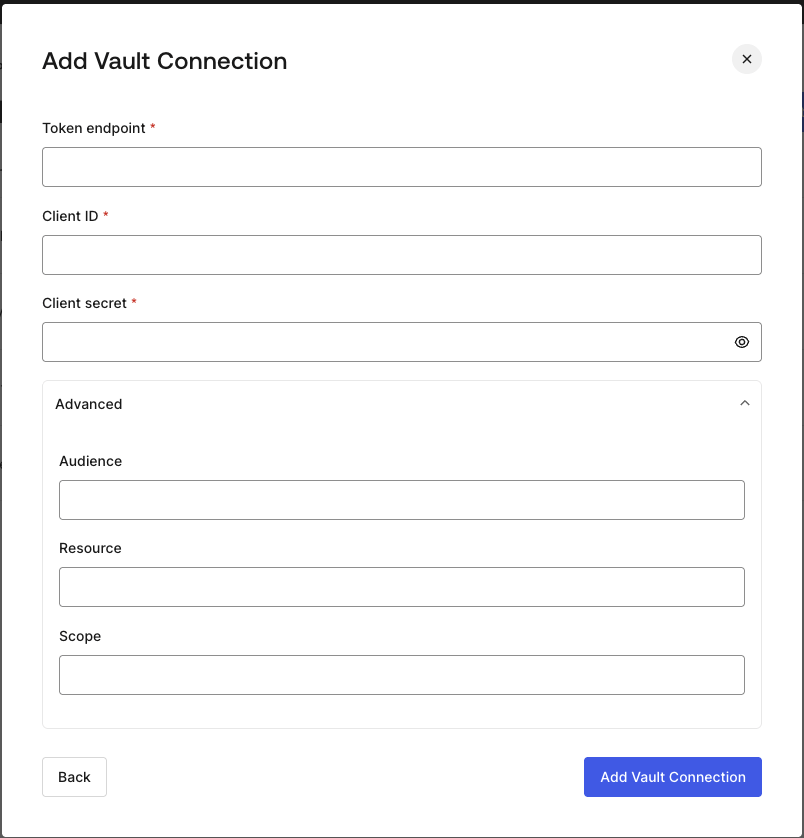
**Client Credentials** 認証を使用して HTTP Vault 接続を設定するには、必要なパラメーターを指定します。
<Frame>
  <img src="https://mintcdn.com/docs-dev-feat-docs-5612-expanded-grant-support-ea/fO9QR70_Gdrw6w5B/docs/images/customize/forms/vaults/http-vault-connection-oauth-client-credentials.png?fit=max&auto=format&n=fO9QR70_Gdrw6w5B&q=85&s=e062049954758040635359db01f25e86" alt="Auth0 Dashboard > Actions > フォーム > Vault > HTTP " data-og-width="804" width="804" data-og-height="838" height="838" data-path="docs/images/customize/forms/vaults/http-vault-connection-oauth-client-credentials.png" data-optimize="true" data-opv="3" srcset="https://mintcdn.com/docs-dev-feat-docs-5612-expanded-grant-support-ea/fO9QR70_Gdrw6w5B/docs/images/customize/forms/vaults/http-vault-connection-oauth-client-credentials.png?w=280&fit=max&auto=format&n=fO9QR70_Gdrw6w5B&q=85&s=e4a02f5ebe28a69d503db870228e721a 280w, https://mintcdn.com/docs-dev-feat-docs-5612-expanded-grant-support-ea/fO9QR70_Gdrw6w5B/docs/images/customize/forms/vaults/http-vault-connection-oauth-client-credentials.png?w=560&fit=max&auto=format&n=fO9QR70_Gdrw6w5B&q=85&s=11142e730689c4a603acd954694f8aa4 560w, https://mintcdn.com/docs-dev-feat-docs-5612-expanded-grant-support-ea/fO9QR70_Gdrw6w5B/docs/images/customize/forms/vaults/http-vault-connection-oauth-client-credentials.png?w=840&fit=max&auto=format&n=fO9QR70_Gdrw6w5B&q=85&s=02b839743553c2d4b002449d2741d720 840w, https://mintcdn.com/docs-dev-feat-docs-5612-expanded-grant-support-ea/fO9QR70_Gdrw6w5B/docs/images/customize/forms/vaults/http-vault-connection-oauth-client-credentials.png?w=1100&fit=max&auto=format&n=fO9QR70_Gdrw6w5B&q=85&s=5eab57f7c143fdbc2995a8789a444cf2 1100w, https://mintcdn.com/docs-dev-feat-docs-5612-expanded-grant-support-ea/fO9QR70_Gdrw6w5B/docs/images/customize/forms/vaults/http-vault-connection-oauth-client-credentials.png?w=1650&fit=max&auto=format&n=fO9QR70_Gdrw6w5B&q=85&s=ac4b54a9f6531f6891d6e6d4423bdd82 1650w, https://mintcdn.com/docs-dev-feat-docs-5612-expanded-grant-support-ea/fO9QR70_Gdrw6w5B/docs/images/customize/forms/vaults/http-vault-connection-oauth-client-credentials.png?w=2500&fit=max&auto=format&n=fO9QR70_Gdrw6w5B&q=85&s=01ff9fae075a74b8b137cde4d7ed6573 2500w" />
</Frame>

<h3 id="input-settings-2">
  入力設定
</h3>

| Parameter | Description |
| - | - |
| Tenant Endpoint | アクセストークンを発行する認可サーバーの Tenant Endpoint。 |
| Client ID | カスタム API へのアクセスを認可された M2M アプリケーションの Client ID。 |
| Client Secret | カスタム API へのアクセスを認可された M2M アプリケーションの Client Secret。 |
| Audience (Optional) | カスタム API の audience。通常は Auth0 で定義したカスタム API で使用します。 |
| Resource (Optional) | カスタム API の Resource。audience とほぼ同じ意味を持つ標準パラメーターです。 |
| Scope (Optional) | スペース区切りの文字列形式で指定するスコープのリスト。 |

<h2 id="configure-your-http-vault-connection-for-api-key">
  API Key 用の HTTP Vault 接続を設定する
</h2>

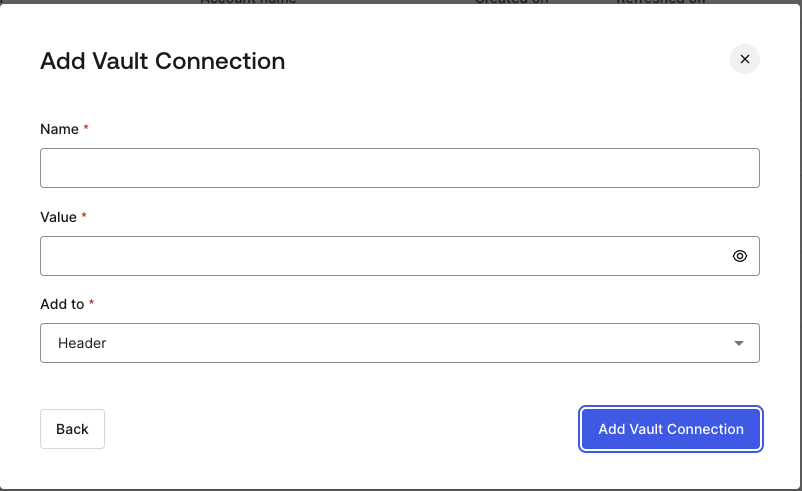
**API Key** 認証を使用して HTTP Vault 接続を設定するには、必要なパラメーターを指定します。
<Frame>
  <img src="https://mintcdn.com/docs-dev-feat-docs-5612-expanded-grant-support-ea/fO9QR70_Gdrw6w5B/docs/images/customize/forms/vaults/http-vault-connection-api-key.png?fit=max&auto=format&n=fO9QR70_Gdrw6w5B&q=85&s=5df271f8d2d67b3712f08a5e893388a7" alt="Auth0 Dashboard > Actions > フォーム > Vault > HTTP " data-og-width="802" width="802" data-og-height="491" height="491" data-path="docs/images/customize/forms/vaults/http-vault-connection-api-key.png" data-optimize="true" data-opv="3" srcset="https://mintcdn.com/docs-dev-feat-docs-5612-expanded-grant-support-ea/fO9QR70_Gdrw6w5B/docs/images/customize/forms/vaults/http-vault-connection-api-key.png?w=280&fit=max&auto=format&n=fO9QR70_Gdrw6w5B&q=85&s=d81088a6fb78fd862a114ead10385af7 280w, https://mintcdn.com/docs-dev-feat-docs-5612-expanded-grant-support-ea/fO9QR70_Gdrw6w5B/docs/images/customize/forms/vaults/http-vault-connection-api-key.png?w=560&fit=max&auto=format&n=fO9QR70_Gdrw6w5B&q=85&s=d329bf720d154f73ca315ad3767b475b 560w, https://mintcdn.com/docs-dev-feat-docs-5612-expanded-grant-support-ea/fO9QR70_Gdrw6w5B/docs/images/customize/forms/vaults/http-vault-connection-api-key.png?w=840&fit=max&auto=format&n=fO9QR70_Gdrw6w5B&q=85&s=143e3a1849c618f672ea941b544ac5b1 840w, https://mintcdn.com/docs-dev-feat-docs-5612-expanded-grant-support-ea/fO9QR70_Gdrw6w5B/docs/images/customize/forms/vaults/http-vault-connection-api-key.png?w=1100&fit=max&auto=format&n=fO9QR70_Gdrw6w5B&q=85&s=4c046f4189c810e8202564eb6995dcd7 1100w, https://mintcdn.com/docs-dev-feat-docs-5612-expanded-grant-support-ea/fO9QR70_Gdrw6w5B/docs/images/customize/forms/vaults/http-vault-connection-api-key.png?w=1650&fit=max&auto=format&n=fO9QR70_Gdrw6w5B&q=85&s=d9f2d2051303d6b8114f0d318fe053be 1650w, https://mintcdn.com/docs-dev-feat-docs-5612-expanded-grant-support-ea/fO9QR70_Gdrw6w5B/docs/images/customize/forms/vaults/http-vault-connection-api-key.png?w=2500&fit=max&auto=format&n=fO9QR70_Gdrw6w5B&q=85&s=0af33004f3f91eda343a410b3ef689dc 2500w" />
</Frame>

<h3 id="input-settings-3">
  入力設定
</h3>

| Parameter | Description |
| - | - |
| Name | Header またはクエリパラメータとして追加する API Key の名前。 |
| Value | Header またはクエリパラメータとして追加する API Key の値。 |
| Add To | デフォルトでは Header に追加されます。API Key を Header として追加するか、クエリパラメータとして追加するかを指定します。 |

<h2 id="configure-your-http-vault-connection-for-basic-authentication">
  Basic Authentication の HTTP Vault 接続を設定する
</h2>

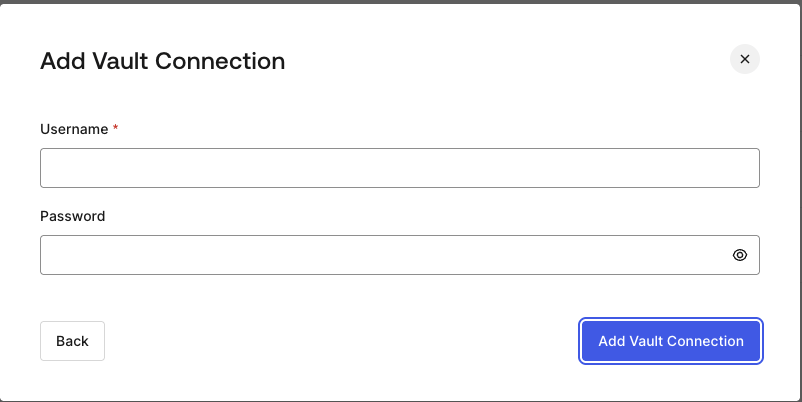
**Basic Auth** 認証を使用する HTTP Vault 接続を設定するには、必要なパラメーターを設定します。
<Frame>
  <img src="https://mintcdn.com/docs-dev-feat-docs-5612-expanded-grant-support-ea/fO9QR70_Gdrw6w5B/docs/images/customize/forms/vaults/http-vault-connection-basic-authentication.png?fit=max&auto=format&n=fO9QR70_Gdrw6w5B&q=85&s=3f8faf9f63c31e250e6d09e5ea5b2bd1" alt="Auth0 Dashboard > Actions > フォーム > Vault > HTTP " data-og-width="802" width="802" data-og-height="402" height="402" data-path="docs/images/customize/forms/vaults/http-vault-connection-basic-authentication.png" data-optimize="true" data-opv="3" srcset="https://mintcdn.com/docs-dev-feat-docs-5612-expanded-grant-support-ea/fO9QR70_Gdrw6w5B/docs/images/customize/forms/vaults/http-vault-connection-basic-authentication.png?w=280&fit=max&auto=format&n=fO9QR70_Gdrw6w5B&q=85&s=e00ad26cfcea683d09569f1af222c5e4 280w, https://mintcdn.com/docs-dev-feat-docs-5612-expanded-grant-support-ea/fO9QR70_Gdrw6w5B/docs/images/customize/forms/vaults/http-vault-connection-basic-authentication.png?w=560&fit=max&auto=format&n=fO9QR70_Gdrw6w5B&q=85&s=3854cbdaa2f97c9075039e369fd0da40 560w, https://mintcdn.com/docs-dev-feat-docs-5612-expanded-grant-support-ea/fO9QR70_Gdrw6w5B/docs/images/customize/forms/vaults/http-vault-connection-basic-authentication.png?w=840&fit=max&auto=format&n=fO9QR70_Gdrw6w5B&q=85&s=38d59310e9c80c442dac5e97a0116a1f 840w, https://mintcdn.com/docs-dev-feat-docs-5612-expanded-grant-support-ea/fO9QR70_Gdrw6w5B/docs/images/customize/forms/vaults/http-vault-connection-basic-authentication.png?w=1100&fit=max&auto=format&n=fO9QR70_Gdrw6w5B&q=85&s=f9a3f617916ecf31d6aa04fb7d358bd3 1100w, https://mintcdn.com/docs-dev-feat-docs-5612-expanded-grant-support-ea/fO9QR70_Gdrw6w5B/docs/images/customize/forms/vaults/http-vault-connection-basic-authentication.png?w=1650&fit=max&auto=format&n=fO9QR70_Gdrw6w5B&q=85&s=c3e15927796f26b2182c27e1ea212dfa 1650w, https://mintcdn.com/docs-dev-feat-docs-5612-expanded-grant-support-ea/fO9QR70_Gdrw6w5B/docs/images/customize/forms/vaults/http-vault-connection-basic-authentication.png?w=2500&fit=max&auto=format&n=fO9QR70_Gdrw6w5B&q=85&s=9a6733ab7b17f953a46a249517125dc9 2500w" />
</Frame>

<h3 id="input-settings-4">
  入力設定
</h3>

| Parameter | Description |
| - | - |
| ユーザー名 | 連結してBase64エンコードし、Basic Authorization ヘッダーパラメーターとして追加するユーザー名。 |
| パスワード | 連結してBase64エンコードし、Basic Authorization ヘッダーパラメーターとして追加するパスワード。 |

<Warning>
  Basic Auth が設定された HTTP Vault 接続は、現在 Flows HTTP Request Action に組み込まれているオプションを将来的に置き換える予定です。
</Warning>
